


We're excited to share the latest improvements and enhancements across the Syncware platform.
Platform Updates
Improved Excel export functionality
Support exporting larger data sets beyond the previous 50-page limit. Exports now run asynchronously, allowing the system to process larger volumes of data without encountering an error or causing the download to fail. Because exports are now processed asynchronously, Excel exports may take longer to complete than they did previously. This enhancement applies to Customers, Orders, and Products exports.
Updated the Syncware platform to the latest supported versions of the technologies that power the platform, including React, Kendo UI, .NET Core, and other underlying system components. This helps ensure the platform remains secure, reliable, and maintainable, while improving performance and compatibility and reducing the risk of issues caused by outdated or unsupported technologies. It also provides a stronger foundation for future enhancements and helps protect the customer’s long-term investment in the platform.
Integration Updates
Faire
Minimum Order Quantity configuration
This new setting allows the minimum order quantity (MOQ) to be set on products when they are uploaded to Faire. Note: that this sets the same minimum order quantity for all products uploaded to Faire from Syncware.
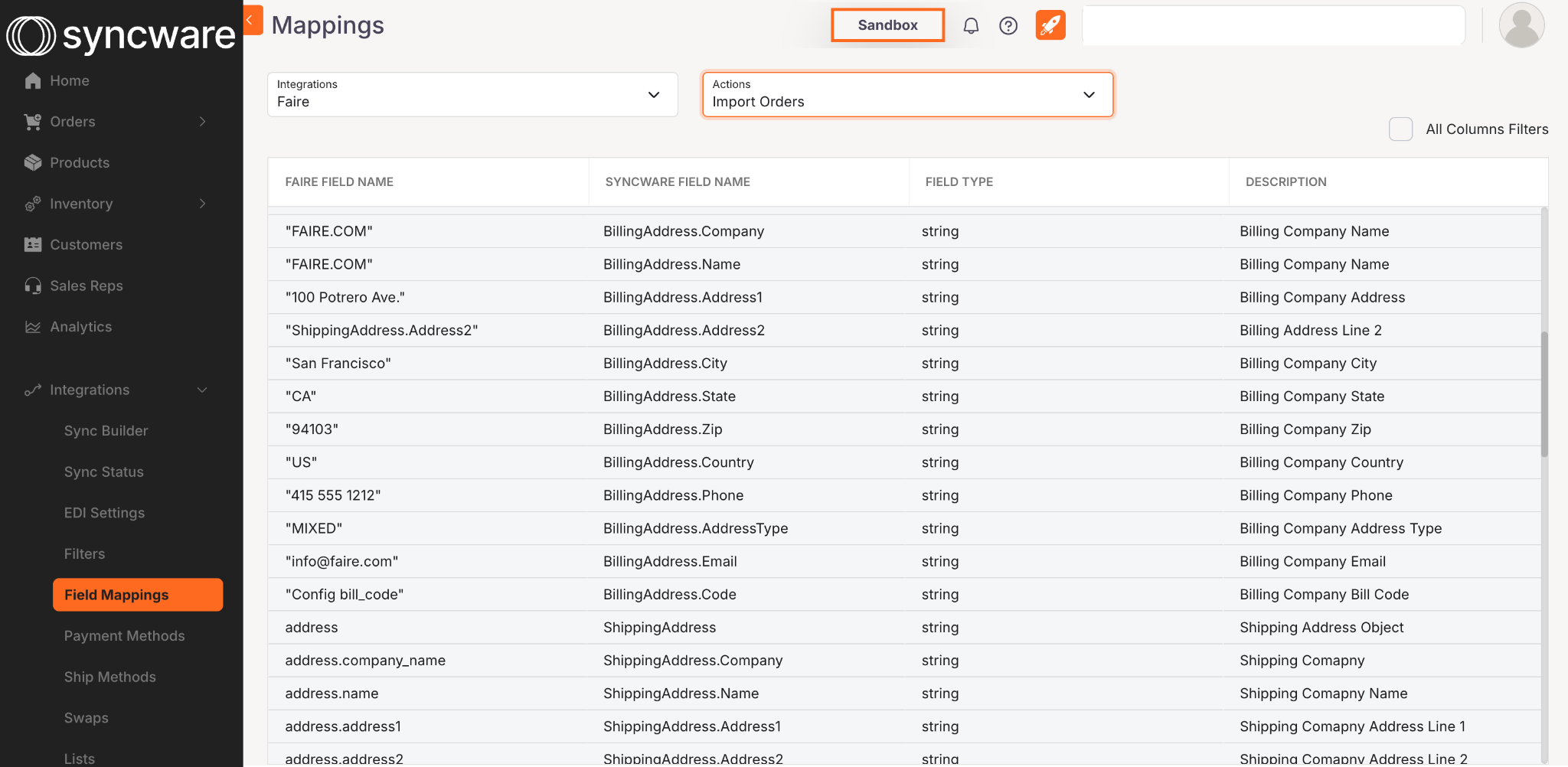
Field Mappings are now visible
Field Mappings from Faire > Syncware can be found in the Syncware App. To view, navigate to Integrations > Field Mappings. From there, you can select the Integration (Faire) and the Action to view the mappings. This is currently a static list and cannot be edited.
MarketTime
Five new advanced configurations have been added to adjust data between MarketTime and your other systems
Product Visible on MarketTime
This new setting allows you to set product visibility in MarketTime. Turn this configuration ON to have products uploaded to MarketTime via Syncware visible upon upload. If OFF, products will be marked as non-visible. Please note that this configuration sets the visibility for ALL products uploaded to MarketTime via Syncware.
Mark Products As Commissionable
This new setting allows you to set the commission status in MarketTime when products are uploaded. Turn the configuration ON to have all products uploaded to MarketTime via Syncware marked as commissionable. Please note that this configuration sets the commission status for ALL products uploaded to MarketTime via Syncware.
Map Item to UPC2
This new setting allows you to map the Item Number or SKU to the UPC2 field in MarketTime when products are uploaded via Syncware.
ApparelMagic
Fixed an issue where the SKU was incorrectly appearing in the product Title field. Moving forward, SKUs will display in the SKU field, while product names will correctly display in the Title field.
Follow us on LinkedIn to get these Product Updates in your newsfeeds.
